Chiaseanh's website frame border

Increase engagement and connection at corporate events

Encourage attendees to share their experiences

Create event
(Free)

conference page hero section image

Step 1

Tutorial step 1 illustration

Create event

Step 2

Tutorial step 2 illustration

Share a QR code or link

Step 3

Tutorial step 3 illustration

Guests upload photos, videos, or messages

Step 4

Tutorial step 4 illustration

Display live slideshows and save your event album

Step 1

Tutorial step 1 illustration

Create event

Step 2

Tutorial step 2 illustration

Share a QR code or link

Step 3

Tutorial step 3 illustration

Guests upload photos, videos, or messages

Step 4

Tutorial step 4 illustration

Display live slideshows and save your event album

A professional solution for corporate events

note illustration 1

Looking for an easy activity people can join without disrupting the event flow?

How can photos and videos be collected neatly and consistently during and after the event?

And how can your internal team easily compile photos for posting, internal sharing, or reporting?

note illustration 2

A few simple steps are all it takes to overcome these challenges.

Quick to set up, no complicated preparation for corporate events

Place the QR code around the venue so attendees can easily share content.

image icon

Gather photos and videos from participants

Each person brings a different perspective - the event album reflects everything that happened.

recorder icon

Live slideshow

New content can be displayed on a large screen - perfect for conferences, workshops, or internal events.

connect icon

Quick notes & sharing

Participants can share content during the event for later communications and reporting.

privacy icon

Privacy & control

Only authorized participants can join. Content can be previewed and moderated.

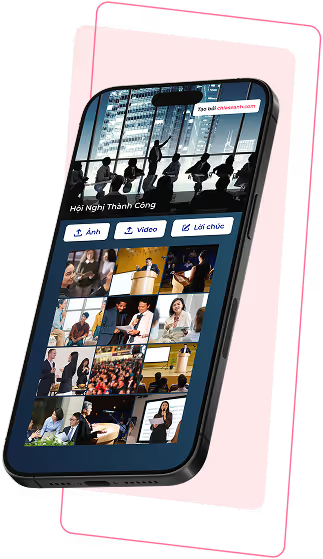
Corporate event ChiaSeAnh app screenshot
image icon

Gather photos and videos from participants

Each person brings a different perspective - the event album reflects everything that happened.

recorder icon

Live slideshow

New content can be displayed on a large screen - perfect for conferences, workshops, or internal events.

connect icon

Quick notes & sharing

Participants can share content during the event for later communications and reporting.

privacy icon

Privacy & control

Only authorized participants can join. Content can be previewed and moderated.

Frequently Asked Questions

How the event album works

question mark icon

Do guests need to install an app?

No. Guests imply scan the QR code or open the event link to participate.

question mark icon

Do guests need to create an account?

No. Guests can upload content immediately after opening the link. Only the event organizer needs an account to manage the album.

question mark icon

Where should I place the QR code at the event?

You can place the QR code at the check-in area, registration desk, stage backdrop, or display it on a large screen during the event.

question mark icon

Is the event album private?

Yes. Only guests with the event link or QR code can access and share content.

question mark icon

Can I control the content in the album?

Yes. You can preview, approve, or hide guest uploads before they appear in the album or slideshow.

question mark icon

Can I download and share the album after the event?

Yes. You can download all photos and videos and share the digital album with guests after the event ends.

Frequently Asked Questions

How the event album works

question mark icon

Khách mời có cần cài app không?

Không. Khách mời chỉ cần quét mã QR hoặc mở đường dẫn.

question mark icon

Khách mời có cần đăng ký tài khoản không?

Không. Chỉ cần vào đường dẫn, khách mời có thể đăng tải ngay lập tức. Chỉ người quản lý album cần đăng ký.

question mark icon

Hình ảnh và video có thể trình chiếu trực tiếp trong sự kiện không?

Có. Ảnh và video tải lên sẽ được cập nhật liên tục và hiển thị trong slideshow trực tiếp.

question mark icon

Nội dung album có thể được kiểm soát không?

Có. Bạn có thể xem trước, duyệt hoặc ẩn nội dung trước khi chúng xuất hiện trong album hoặc slideshow.

question mark icon

Album sự kiện có riêng tư không?

Có. Chỉ những người có link hoặc mã QR của sự kiện mới có thể truy cập và chia sẻ nội dung.

question mark icon

Album có thể được tải và chia sẻ sau sự kiện không?

Có. Bạn có thể tải hình ảnh, video và chia sẻ album số với khách mời sau khi sự kiện kết thúc.

Do guests need to install an app?

No. Guests imply scan the QR code or open the event link to participate.

Do guests need to create an account?

No. Guests can upload content immediately after opening the link. Only the event organizer needs an account to manage the album.

Where should I place the QR code at the event?

You can place the QR code at the check-in area, registration desk, stage backdrop, or display it on a large screen during the event.

Is the event album private?

Yes. Only guests with the event link or QR code can access and share content.

Can I control the content in the album?

Yes. You can preview, approve, or hide guest uploads before they appear in the album or slideshow.

Can I download and share the album after the event?

Yes. You can download all photos and videos and share the digital album with guests after the event ends.

Chiaseanh's website frame border
arrow up